Preface
Flash Attention is almost mandatory for LLM training and inference because of the speedup it brings. Usually pip install flash-attn is enough, but for specific hardware (e.g., A800) or bleeding-edge features you sometimes have to build from source.
After a few rounds of frustration, here’s the end-to-end process I used to build flash-attn from source on an A800 server, plus the traps to avoid.
Environment
Hardware/Software
- Server: 64-core CPU, 512G RAM
- GPU: NVIDIA A800 80G (PCIe)
- CUDA: 12.2
- PyTorch: 2.7.1+cu118
Official README
Requirements:
- CUDA toolkit or ROCm toolkit
- PyTorch 2.2 and above.
packagingPython package (pip install packaging)ninjaPython package (pip install ninja) *- Linux. Might work for Windows starting v2.3.2 (positive reports ), but Windows builds need more testing.
* Make sure
ninjais installed and works (ninja --versionshould exit 0). If not, reinstall (pip uninstall -y ninja && pip install ninja). Withoutninja, builds can take ~2h single-threaded; withninja, 3–5 minutes on a 64-core box.To install:
pip install flash-attn --no-build-isolationOr build from source:
python setup.py installIf your machine has less than 96GB RAM and lots of CPU cores, limit parallel jobs with
MAX_JOBS.
A small rant: “3–5 minutes on a 64-core machine” must be on some dream hardware…
Core Build Steps
Upgrade core build tools
Keep pip, wheel, and setuptools current to dodge weird slowdowns.
|
Old setuptools can be painfully slow—ask me how I know.
Install and verify ninja
The README stresses ninja. Without it, the build falls back to single-threaded and drags on forever.
Install
pip install ninjaVerify
The official check is
ninja --versionfollowed byecho $?for exit code 0. I prefer a visual check: start the build, open another terminal, runhtop, and see dozens ofcicc/nvccprocesses pegging the CPUs. If not, reinstallninjawithpip uninstall -y ninja && pip install ninja.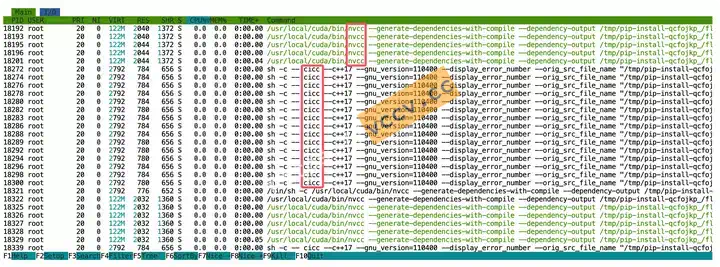
Set critical env vars
These variables decide whether the build succeeds and how fast.
FLASH_ATTN_CUDA_ARCHS: limit architecturesTell the compiler which compute capability to target. A100 and A800 are compute capability
8.0, so set it to80. Without it, the build will generate code for many architectures—wasting time.- Lookup: NVIDIA CUDA GPUs
export FLASH_ATTN_CUDA_ARCHS="80"MAX_JOBS: parallel build workersControls how many CPU cores
ninjauses. More cores = faster but also more RAM.- My run: On 64 cores / 512GB RAM, I set
MAX_JOBS=64. - Result: 64 cores maxed, peak RAM >300GB, build took ~10–15 minutes. When RAM usage in
htopdrops, the build is almost done. - Tip: If RAM is tighter, start with half the cores, e.g.,
MAX_JOBS=32.
- My run: On 64 cores / 512GB RAM, I set
Install
Combine everything and build:
|
--no-build-isolation is critical so the build process can see the env vars you exported in the current shell.
Troubleshooting
g++: fatal error: Killed signal terminated program cc1plus- Cause: OOM (too many parallel jobs). Lower
MAX_JOBS(e.g., 64 → 32 → 16).
- Cause: OOM (too many parallel jobs). Lower
GCC too new
At publish time, the build requires
gcc-11/g++-11.Fix (Ubuntu 22.04 example):
apt install gcc-11 g++-11
which gcc-11
which g++-11
export CC=/usr/bin/gcc-11
export CXX=/usr/bin/g++-11
Build takes forever
- Likely
ninjaisn’t actually used and the build is single-threaded. Verify/reinstallninja.
- Likely
CUDA-related build errors
- Usually
FLASH_ATTN_CUDA_ARCHSis wrong or PyTorch/CUDA toolkit versions don’t match. Double-check GPU model vs. compute capability, and comparenvidia-smiwithnvcc --version.
- Usually
Alternatives
If source builds are too painful, try:
- Prebuilt pip wheels:
pip install flash-attnsometimes works out of the box, but versions may lag and hardware support isn’t guaranteed. - conda:
conda install flash-attn -c conda-forgemight provide a prebuilt package.